



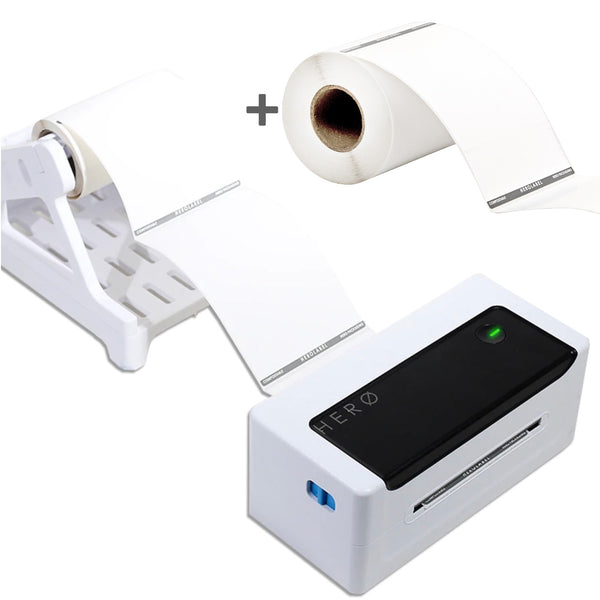


HERO Shipping Label Thermal Printer HZD950-PRO (Black and White) - USB and Bluetooth Direct Thermal 300DPI
per unit
Tax included
Product Description
Now includes a BONUS roll of Compostable Shipping Labels to get you printing faster! Now also comes with 2 YEAR WARRANTY.
The Hero Black & White Shipping Label Printer is an amazingly convenient and fast direct thermal printer that can help you print labels like the packaging boss we know you are! Equipped with USB and Bluetooth wire-free functionality (for printing from mobile or tablet via our app), the HERO Label Printer is your new packaging BFF.
The HZD950-PRO (300 dpi high resolution) is perfect for Auspost MyPOST Business and ALL other shipping carriers and shipping systems including Sendle, DHL, TNT, FedEx, Couriers Please, Shippit, StarShipIT, and all other carriers.
For so long we have been asked which is the best direct thermal label printer in Australia, and so we created our own! It took us months to perfect, but it’s officially the best in the market (according to us).
What is direct thermal, you ask? It means this printer requires no ink or toner! Save on hundreds of dollars on ink costs over the lifetime of the printer.
This printer works seamlessly with HEROLABEL shipping label rolls. One roll of our HEROLABEL Compostable Shipping Labels are included with each printer, and you can also get your compostable shipping labels here as a one-off purchase and also a subscription. Printing is in black and white like all other direct thermal printers. The printer does not print in colour as there is no ink used.
Label Templates:
Features:
- Comes with the HERO PRINTER and a roll holder.
- USB or Bluetooth connectivity (Bluetooth works via an app on iPhone, iPad, and Android mobile/tablet devices, and the Bluetooth connection can only print PDF files).
- It works with any direct thermal labels (both rolls and folded labels), but we recommend our compostable HEROLABEL rolls here.
- Requires no toner or ink (direct thermal printer)
- High speed printing via USB cable.
- Compatible with major shipping platforms including Auspost MyPOST Business, Sendle, Shippit, Starshipit, Shipstation, eBay, Amazon, Shopify and more.
- Compatible with Mac and Windows
- Works with any direct thermal circles labels, rectangle labels, square labels.
- Can be used for shipping labels or branding labels
- Printer dimensions: 218L x 105W x 90H mm
- Roll holder dimensions: 200L x 135W x 155H mm (The roll holder sits around 10cm behind the printer.)
- Minimum label width: 40 mm - 110 mm.
- Comes with an Australian warranty.
- In the box:
- Hero Printer
- Label stand
- Power cord
- USB cable
- USB-A to USB-C adaptor (for compatibility with newer laptops with only USB-C ports)
-
Please note regarding Australia Post international shipments: international express shipments can generally be printed on the Hero Printer using standard sized A6 (100x150mm) labels like our HEROLABELs. However, economy and standard international shipments can only be printed using A4 printers, and this is a limitation from Australia Post. It's best to check this link to make sure your account or shipping platform can print A6-sized international labels.
This printer is compatible with these Hero Labels:
- Compostable Rectangle Stickers for your logo or barcodes
- Compostable Circle Stickers for your logo or product information
Read our Printer FAQs & Instructions page for more information.
Download HERO Printer Drivers:
HZD950-PRO Drivers:
Mac OS
Windows
How to install the Hero Printer on Mac:
How to install the Hero Printer on Windows:
HERO Printer FAQs
If you are looking for printer and label troubleshooting, please click here!
How to install the Hero Printer on Mac:
How to install the Hero Printer on Windows:
Please note: the instruction videos above mention our original printer model HXD840-PRO, but the setup process is identical to the newer model HZD950-PRO.
Is it a direct thermal printer?
Yes, the HERO Printer is a direct thermal printer, which means no ink or toner! Direct thermal printing uses heat-sensitive media that blackens when it passes under the thermal printhead, while thermal transfer printing uses a heated ribbon to produce durable, long-lasting printing on labels.
Does it work with Windows and Mac?
Yes, the HERO Printer works on both Mac and Windows. Drivers can be downloaded using these links:
Download HERO Printer Drivers:
HZD950-PRO Drivers:
Mac OS
Windows
HXD840-PRO Drivers:
Mac OS
Windows
Need more help after following the below instructions? Simply contact us and we can assist!
TO INSTALL ON WINDOWS:
Download and install the driver.
Please note, to install the Windows driver, you may need to temporarily disable Windows virus protection, then turn back on after installing the driver. Follow these steps:
-
Select Start > Settings > Update & Security > Windows Security > Virus & threat protection > Manage settings (or Virus & threat protection settings in previous versions of Windows 10).
-
Switch Real-time protection to Off. Note that scheduled scans will continue to run. However, files that are downloaded or installed will not be scanned until the next scheduled scan.
Once the driver is installed, continue with the following steps:
- The HXD840-PRO or HZD950-PRO printer should now appear in your available list of printers. Select the printer and click Preferences.

- Select Paper Name > 100mm x 150mm as shown:

- Then click Advanced
- Select Print Density > Set Print Density > Density: 1

- Select Print Speed > Set Print Speed > Speed: 1

- These Print Density and Print Speed settings can be tested and changed as needed to achieve the ideal print tailored to your shipping label.
- Click OK until you get back to the Print screen.
- Click Print and your labels should be printing!
TO INSTALL ON MAC:
- Once you've already downloaded and installed the driver for Mac, then you will also need to go to System > Preferences > Printers & Scanners. Then click the + icon and add the HXD840-PRO or HZD950-PRO printer from the menu which pops up:

- After this, please open your shipping label PDF file (ensure this file is an A6 or 100x150mm sized file, not an A4 file) and click Print. Select the HXD840-PRO or HZD950-PRO printer and ensure the settings look like this:
- Then click the drop-down which says "Layout" and select "Printer Features" and ensure the settings look like this:
- Then click "Print" and your labels should print now!
Does it have bluetooth?
Yes, the HERO Printer has Bluetooth capabilities as well as USB! This applies to both the HXD840-PRO and HZD950-PRO models. Please note that Bluetooth only works when printing from Apple or Android mobile devices such as phones or tablets/iPads. Laptop and desktop computers need to print using the USB cable supplied.
To print using Bluetooth:
- Go to the App Store or Google play and search for “ThermalPrint”.
- Download the app.
- Once open, click the printer icon in the top right corner and select the printer model HXD840-PRO or HZD950-PRO.
- The printer should now be connected.
- In the app, go to Printer Settings and select the printer model HXD840-PRO or HZD950-PRO.
- Now go to your phone's file browser.
- Find your shipping label file in your phone's file browser and tap the 'share' icon.
- Select the ThermalPrint app.
- Your label file is now accessible through the ThermalPrint app.
- You can now select PDF files to print shipping labels.
Which couriers does it work with?
The HERO printer works with all couriers, including Australia Post, Sendle, Shippit, Starshipit, TNT, DHL and more. Please choose the correct model as per the details below:
- HXD840-PRO (203 dpi): Suits Sendle, DHL, TNT, Couriers Please, Shippit, StarShipIT, and most other carriers. Does NOT suit Auspost MyPOST Business.
- HZD950-PRO (300 dpi): Perfect for Auspost MyPOST Business and ALL other shipping carriers and shipping systems.
Please note regarding Australia Post international shipments: international express shipments can be printed on the Hero Printer using standard sized A6 (100x150mm) labels like our HEROLABELs. However, economy and standard international shipments can only be printed using A4 printers, and this is a limitation from Australia Post.
Does it integrate with my website?
Yes, this HERO printer will work with Shopify, Wix, WooCommerce, Etsy and any other website platform. You just need the ability to generate shipping labels from within your website platform. For example, Shopify allows all customers to create Sendle shipments. Please ensure you have the ability to create shipping labels from your website.
Does it work on tablets and other devices?
Yes, the HERO printer has an app for iPads, iPhones, Android phones and Android tablets including all Samsung mobiles and tablets.
Which labels does it work with?
The HERO printer works with direct thermal labels with a maximum width of 100mm. We use 100x149mm labels (standard shipping labels).
The labels can be on rolls or stacked.
Is it DYMO compatible?
DYMO labels cannot be used on any printer other than on Dymo printers. Dymo intentionally does this to lock users into using their expensive Dymo-branded labels. Our Compostable HEROLABEL Shipping Labels work perfectly on the Hero printers.
Do barcodes and QR codes print clearly?
Yes, barcodes and QR codes can be printed clearly, but you will need to test and adjust settings to ensure it's perfect depending on your shipping carrier/partner.
Are HEROLABEL rolls sold separately?
Yes, HEROLABEL rolls are sold separately on our website under Accessories.
Are your labels Biodegradable?
Our HEROLABELs are compostable!
----------------------------------------------
Advanced Tech Support (needed when instructed by Hero Tech Support ONLY):
MyPost Business Customers - how to get barcodes printing even more clearly:
REVIEWS
Shipping & Returns
Everything you need to know about dispatch, delivery, and our returns process.
General Shipping Information
Same-day dispatch for orders placed before 12pm AEST/AEDT on business days. All other orders ship the next business day. Holiday trading hours may differ — check our website for the latest.
Australia Post is currently delivering as normal. Choose Express Post at checkout if you need products quickly. Sydney customers also have same-day delivery options at checkout.
Some delivery delays may apply. Please allow extra time and check your tracking link before contacting us. Keep buffer stock on hand to avoid running out.
In-Stock (Ready to Ship) Orders
Orders placed before 12pm AEDT on a business day are dispatched same day. You'll receive a shipping confirmation with tracking details as soon as your order leaves our warehouse.
Our order system is highly automated — we cannot amend or change orders once placed under any circumstances. If you need to return mailers, please see our returns information below.
Unforeseen events such as natural disasters may impact dispatch times. Check our website for the most up-to-date information.
Custom Printed Orders
All custom orders begin with a PDF proof — allow 2–3 business days. Printing only starts after you approve the proof. All timings below are from proof approval.
* 300+ unit orders may be split across 2–3 deliveries. We'll always contact you when this applies.
| Print type | Quantity | Dispatch time |
|---|---|---|
| Basic Logo PrintingSample | Sample | 2–3 days |
| Full-Colour PrintingSample | Sample | 3–7 days |
| Basic Logo PrintingBulk orders | 25–100 units | 3–4 days |
| 250–500 units | 5–6 days | |
| 1,000+ units | 7–10 days | |
| Full-Colour PrintingBulk orders | 25–300 units | 7–10 days |
| 300+ units | Up to 20 days* |
* 300+ units may be split across 2–3 deliveries. Allow up to 20 business days for single-shipment 300+ orders.
| Order type | Quantity | Dispatch time |
|---|---|---|
| Printed Sample | Sample | 2–3 days |
| Bulk Printed Orders | 25–100 units | 3–4 days |
| 250–500 units | 5–6 days | |
| 1,000+ units | 7–10 days |
Australian Orders
Allow 2–8 business days after your order has been dispatched.
Allow 1–3 business days after dispatch. Select at checkout.
Select warehouse pick-up or same-day delivery options directly at checkout.
Unforeseen events may impact delivery times. Always check our website for the latest.
International Orders
Allow 5–20 days depending on your country. Estimated times display in checkout once your address is entered.
Allow 3–7 days to New Zealand, Canada, USA, UK, and other supported countries.
Orders shipped outside Australia are classified as imports in the destination country. You are responsible for paying any applicable import duties and taxes to clear customs.
The shipping carrier will contact you using your order details. If duties are not paid, the shipment will be diverted to commercial composting and cannot be returned. No refunds apply in these cases.
Returns Information
If you've purchased the wrong size or no longer need your mailers, you may be able to return them for store credit within 14 days of purchase. No change-of-mind returns are accepted after this period due to the shelf life of our mailers.
-
1Contact us within 14 days of purchase. No returns accepted after this period under any circumstances.
-
2Returns are subject to handling and restocking fees. The original shipping cost is also deducted from any store credit.
-
3For custom orders not yet printed, a sampling/setup fee of $15–$50 will also be deducted from the credit.
-
4Custom orders that have already been printed cannot be returned under any circumstances.
Sometimes things don't go to plan — and we'll always make it right. Resolutions can include product replacements, store credits, or refunds.
If you have a product issue, please contact us for instructions. We'll generally ask for photos or a short video of the issue to provide the fastest possible resolution.
Pre-Order Information
When a product is out of stock it may move to a pre-order listing. This will be clearly noted on the product page and in your order confirmation.
If you order a pre-order item alongside in-stock items, your entire order is held until pre-order stock is available. We cannot partially ship orders.
Tip: Place pre-order and in-stock items in separate orders to avoid delays.
You'll receive a shipping tracking notification as soon as your pre-order is dispatched. If you have questions, message us for assistance.
